Overview
From chaos to clarity: How Views lifted engagement by 44%
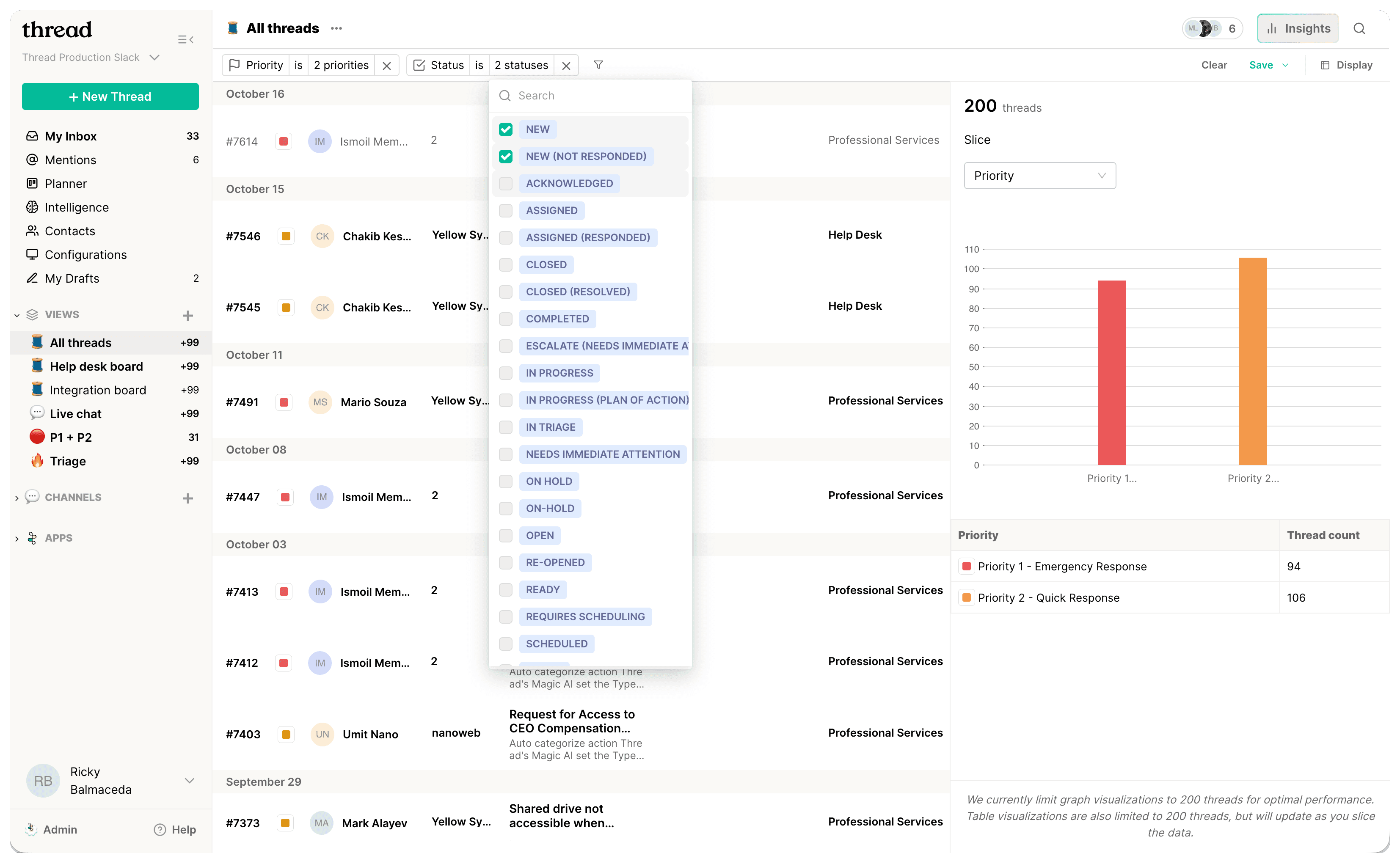
I led the design of Views and Insights, a new organizing system for Inbox that helps partners structure work, prioritize faster, and understand workload at a glance.
The feature drove a 44% lift in engagement and improved our DAU/MAU ratio by 9%.
I owned the project end to end and partnered across Product, Engineering, Customer Success, Growth, and Marketing from discovery through launch.
Problem
Admins were the single point of failure. Only they could set up the workspace, and the setup flow was slow and disjointed. Many took months to configure Inbox, and partners without structure by month three were at high risk of churning.
Without structure, technicians could not adopt Inbox, activation stalled, and teams lost trust in the product. Fixing setup friction was critical for both user success and long-term retention.
Solution
Introduce Views and Insights: a clear, flexible organizing system that helps Admins set up structure in minutes and gives Technicians an immediate sense of what needs attention.
My Role
Lead Product Designer
Duration
Aug '24 to Jan '25
Goals
User goal
Admins needed a setup flow they could complete in minutes, not months. When structure clicked early, technicians logged in and instantly knew where to focus. Clear structure led to faster adoption, better prioritization, and teams staying aligned.
Business goal
Workspace setup was one of the strongest predictors of churn. Partners who still lacked structure by month three were unlikely to stay. Fixing setup friction accelerated activation, reduced CSM load, and increased product stickiness and long-term value.
Problem definition
Understanding the gaps
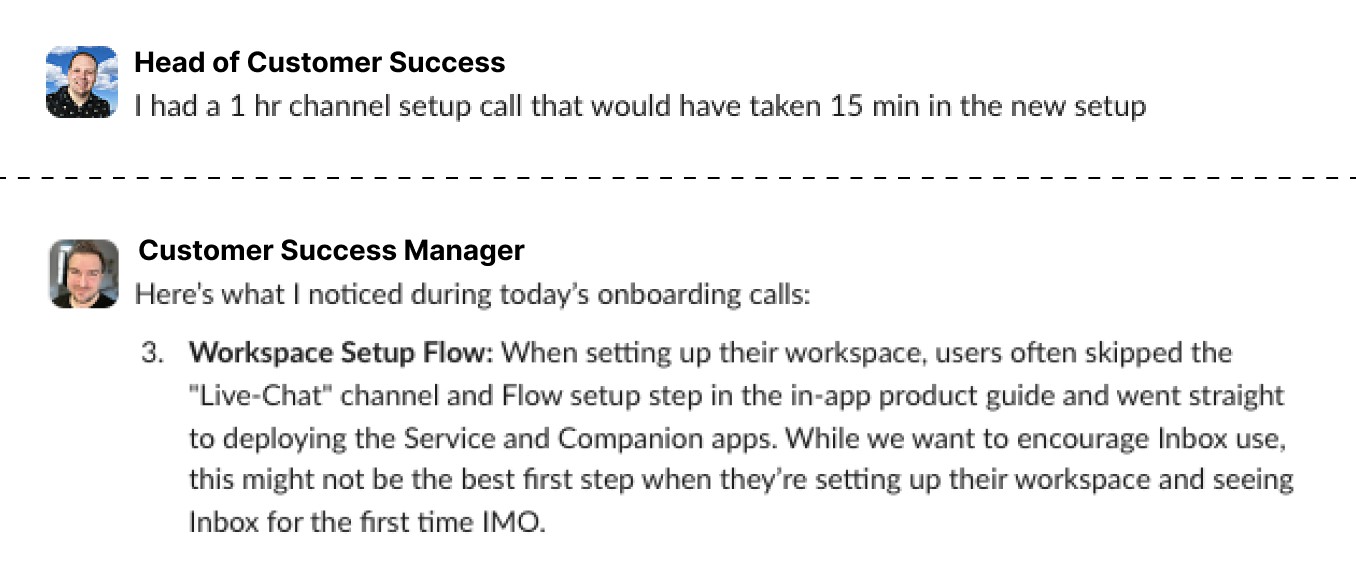
I reviewed onboarding sessions with Customer Success and identified a clear pattern: The workspace setup flow was disjointed and felt unintuitive to go through alone. Users needed a live training sessions to get started using our product.
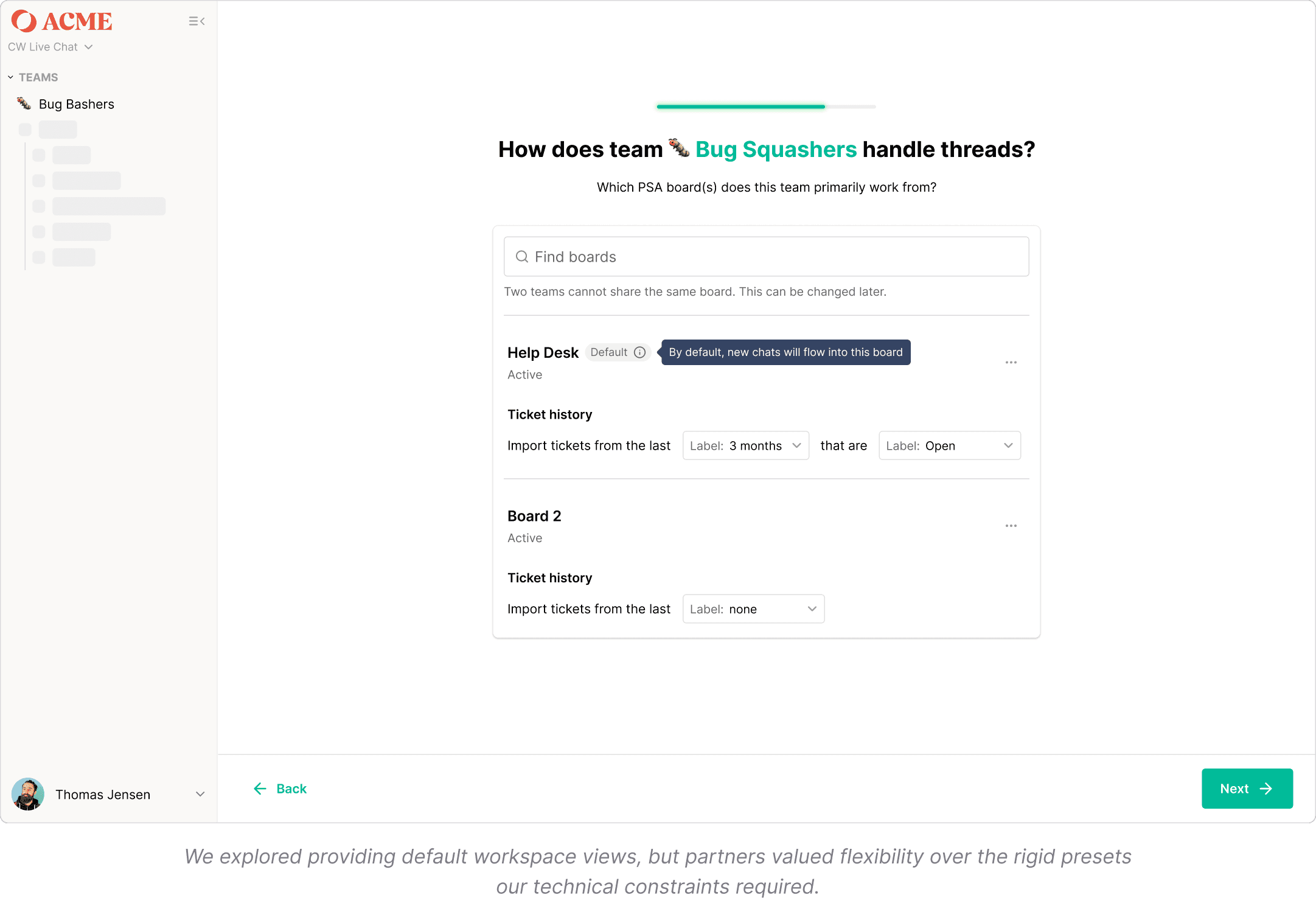
Channel setup was cumbersome and unintuitive, and adding filters didn’t reveal how data changed, preventing users from ever reaching an aha moment.
Identifying the building blocks
Through user interviews and journey mapping, we identified key friction points and narrowed down the most common filters Admins use when setting up service request channels for technicians. These include Board, Priority, Status, Source, Company, and Ticket Owner.
These became the foundation of Views, giving Admins a simple way to recreate how their service desk actually operated.
How might we help Admins set up a clear, scalable workspace quickly, so Technicians can adopt Inbox with confidence from day one?
Shaping the solution
Explorations and tradeoffs
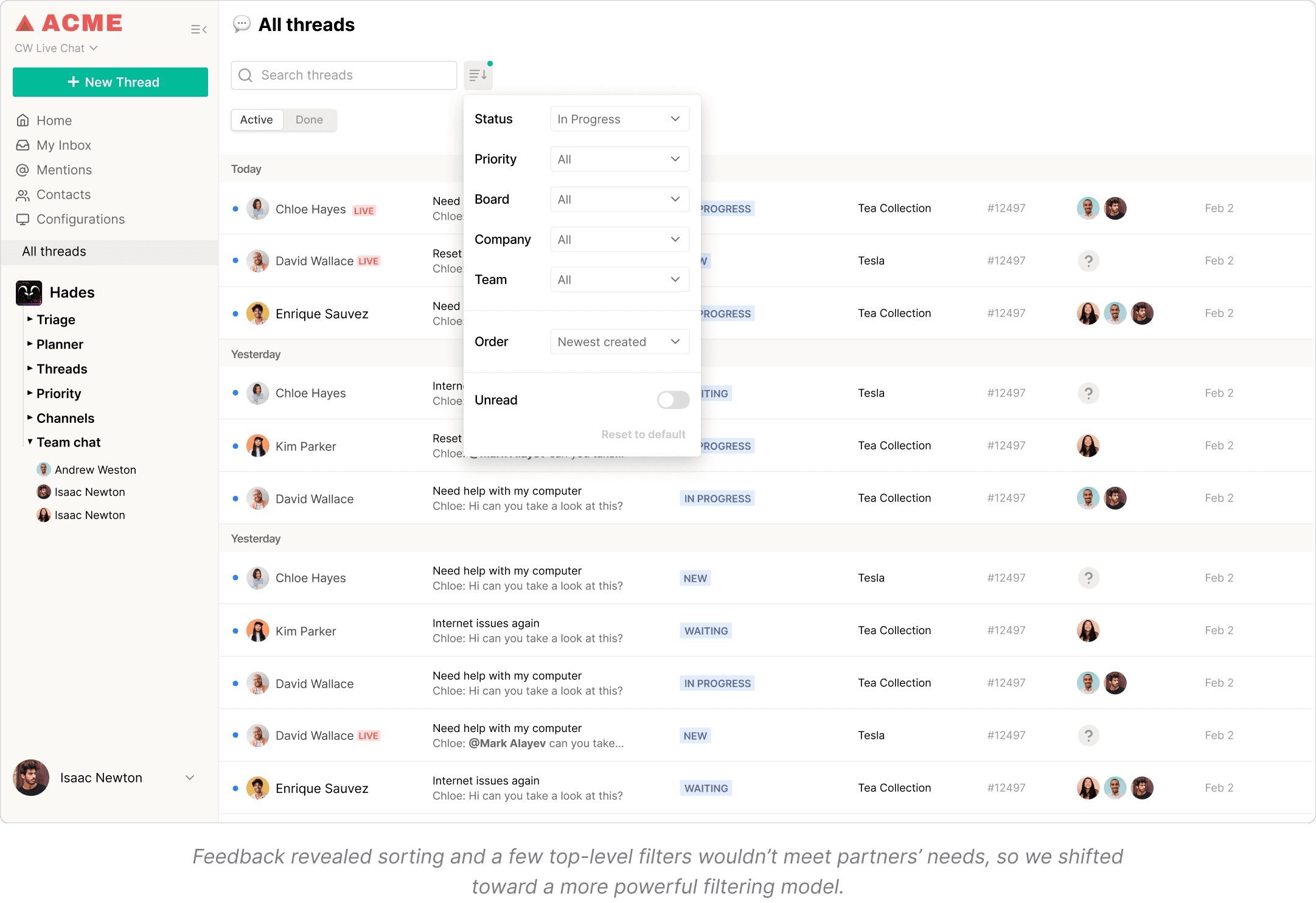
With the core filters in place, I explored how they could shape the workspace. I tested multiple IA patterns and grouping models to balance Admin flexibility with Technician clarity. This included board-first groupings, lifecycle-based clusters, and technician-focused layouts. The goal was to make structure feel obvious, not overwhelming.
Designing interactions that scale
I prototyped flows for building, adjusting, and saving a View. We refined filter behavior, naming patterns, and how Insights should surface without adding noise. Each iteration made setup faster for Admins and focusing easier for Technicians.
Validating the direction
Validating early with customers
Before writing any code, we tested the designs directly with customers using Figma prototypes. These interviews helped us validate the filter model, view behaviors, and interaction patterns, and allowed us to tighten the experience before involving engineering.
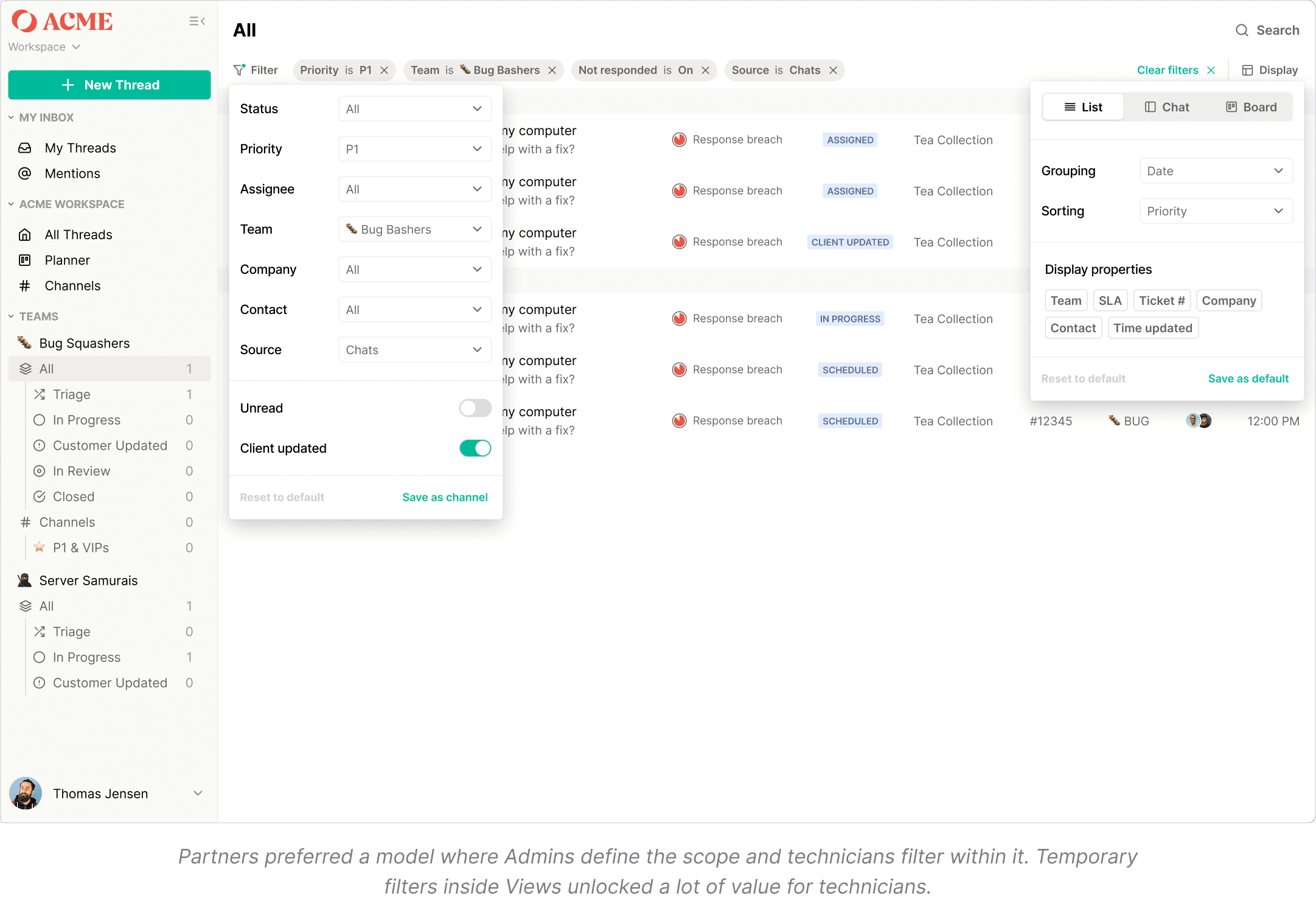
We tested filter setup against real partner workflows to validate that it held up technically and was intuitive to use. This helped us identify gaps and distinguish between must-have features and nice-to-haves.
Refining through internal alpha testing
Once the designs held up in customer sessions, we built an internal alpha and released it to our help desk team. They use Inbox daily to manage real service requests, making them a high-signal proxy for how the feature would perform in production.
Their feedback surfaced edge cases only visible under real volume, including cross-board behavior, filter persistence, and switching patterns. We polished micro-interactions and cleared friction before releasing anything externally.
Final designs
Views: A flexible way to structure work
A flexible, filter-based way for Admins to structure the workspace. Views use the attributes partners rely on most, giving Technicians clear, predictable entry points for their daily work.
Insights: Clarity at a glance
Simple, contextual signals that highlight aging threads, SLA risks, and workload trends. Designed to help teams understand what matters at a glance.
A system that scales
The filtering model behind Views became a foundation for the product.
Since launch, we’ve continued adding high-impact filters based on partner feedback, and the filter components now power other data-heavy parts of our product. The system grows with partner needs and strengthens the entire platform.
We made it easy for Admins to set up their workspace and see value immediately, while giving Technicians a powerful way to find critical work at the right time.
Impact
Adoption and engagement
44% increase in engagement
9% improvement in DAU/MAU
Zero CSM-led setup, with Admins able to configure workspaces independently
Faster activation, with structure set up in minutes rather than weeks
Higher technician adoption, driven by clearer and more predictable workflows
Impact on the business
Reduced churn risk for partners who previously struggled with setup
Removed a major sales blocker, making Inbox easier to adopt for new prospects
Lower operational load on Customer Success
Created a foundation for future features, including Teams and expanded filtering
Learnings
Scope intentionally, unlock faster learning
We originally planned to build both Views and Sub-views at once because partners strongly validated the value of sub-views. But the scope was too large, so we shipped Views first. This ended up being the right decision: launching a focused foundation helped us gather high-signal feedback from real usage, which continues to shape the product today.
Start with the foundation, then grow the system
Replacing channels meant rebuilding a feature-heavy part of the product. I was initially hesitant to ship a lighter v1, but doing so allowed us to move quickly, validate assumptions, and expand the system based on real needs. This reinforced a mindset I now use every day: think big and systematically, scope small, ship, and iterate.
Get in touch